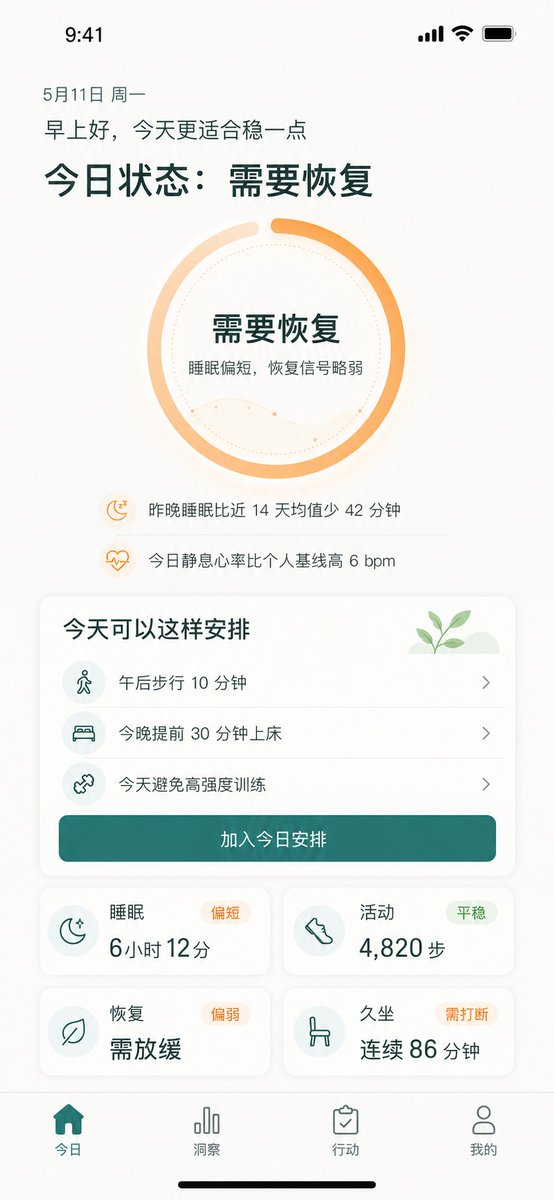
Chinese Wellness Recovery App UI
Generates a polished iPhone dashboard for a Chinese wellness app showing recovery status, suggested actions, metrics, and bottom navigation.
This is a GPT Image 2 prompt case for 产品商业. Use the copy-ready prompt below to generate similar visuals, and review Awesome GPT Image 2 Prompts attribution plus commercial-use rights before reuse.
Prompt
Copy-ready prompt
{
  "type": "高保真移动端健康恢复仪表盘 UI 原型",
  "platform": "iPhone 竖屏,9:41 状态栏,暖白色背景,柔和阴影,圆角卡片,极简健康 App 视觉风格",
  "language": "Simplified Chinese UI 文本",
  "theme": {
    "primary_color": "{argument name=\"primary color\" default=\"Deep blue-green\"}",
    "accent_color": "{argument name=\"accent color\" default=\"warm orange\"}",
    "background": "带有细微米色纹理的米白色",
    "typography": "简洁现代无衬线字体,加粗大号Chinese字体标题,较细的正文文本"
  },
  "screen": {
    "top_status_bar": "左上角显示 9:41 时间,右上角显示蜂窝信号、Wi-Fi 和电池图标",
    "date": "5 月 11 日 周一",
    "greeting": "{argument name=\"greeting text\" default=\"早上好,今天更适合稳一点\"}",
    "main_headline": "{argument name=\"main status headline\" default=\"今日状态:需要恢复\"}"
  },
  "hero_status_ring": {
    "position": "Centered at the top",
    "shape": "大型环形进度环",
    "count": 1,
    "style": "厚实的橙色渐变环,进度约 85%,顶部有小缺口,浅桃色辅助弧线,内部虚线圆圈,内嵌淡淡的波浪线图表",
    "center_text": [
      "需要恢复",
      "睡眠偏短,恢复信号略弱"
    ]
  },
  "insight_rows": {
    "position": "环形下方",
    "count": 2,
    "items": [
      {
        "icon": "带 zzz 的小橙色月亮",
        "text": "昨晚睡眠比近 14 天均值少 42 分钟"
      },
      {
        "icon": "小橙色心跳图标",
        "text": "今日静息心率比个人基线高 6 bpm"
      }
    ]
  },
  "schedule_card": {
    "position": "Central",
    "title": "今天可以这样安排",
    "decoration": "右上角浅绿色山丘上的小绿芽插画",
    "count": 3,
    "items": [
      {
        "icon": "浅青色圆圈内的步行小人",
        "text": "午后步行 10 分钟",
        "chevron": "右箭头"
      },
      {
        "icon": "浅青色圆圈内的床铺图标",
        "text": "今晚提前 30 分钟上床",
        "chevron": "右箭头"
      },
      {
        "icon": "浅青色圆圈内的哑铃/交叉训练图标",
        "text": "今天避免高强度训练",
        "chevron": "右箭头"
      }
    ],
    "primary_button": "加入今日安排"
  },
  "metric_cards": {
    "position": "中下部,2x2 网格布局",
    "count": 4,
    "cards": [
      {
        "title": "sleep",
        "status_badge": "偏短",
        "icon": "带星星的新月",
        "main_value": "6 小时 12 分"
      },
      {
        "title": "Activity",
        "status_badge": "平稳",
        "icon": "鞋子/足迹",
        "main_value": "4,820 步"
      },
      {
        "title": "恢复",
        "status_badge": "偏弱",
        "icon": "leaf",
        "main_value": "需放缓"
      },
      {
        "title": "久坐",
        "status_badge": "需打断",
        "icon": "chair",
        "main_value": "连续 86 分钟"
      }
    ]
  },
  "bottom_navigation": {
    "position": "底部固定标签栏",
    "count": 4,
    "tabs": [
      {
        "label": "today",
        "icon": "实心首页",
        "state": "激活状态,青色"
      },
      {
        "label": "洞察",
        "icon": "bar chart",
        "state": "未激活状态,灰色"
      },
      {
        "label": "action",
        "icon": "剪贴板勾选",
        "state": "未激活状态,灰色"
      },
      {
        "label": "mine",
        "icon": "用户轮廓",
        "state": "未激活状态,灰色"
      }
    ],
    "home_indicator": "最底部的黑色 iPhone 主屏幕指示条"
  },
  "composition": "居中竖屏移动 App 界面原型,留白充裕,Chinese文本清晰易读,柔和圆角矩形,日程行之间有细微分割线,适用于演示展示的健康恢复追踪产品设计"
}
Prompt variables
Editable argument placeholders found in the prompt, with their default values.
More cases in this category
Prioritized by category, input mode compatibility, quality, and lower risk.

Reuse and source notes
Use this prompt safely after previewing the case.
- 1.Copy the prompt or open it directly in Dovoo with the generation button.
- 2.Adjust variables, aspect ratio, and reference images for your own use case.
- 3.Before publishing or paid usage, verify source rights, attribution requirements, and brand or likeness risks.
Can I use this prompt commercially?
Commercial-use status is allowed. Review the original source, license, brand constraints, and legal requirements before paid usage.
Where does this case come from?
This case is imported from Awesome GPT Image 2 Prompts; keep attribution visible and check the source URL before reuse.