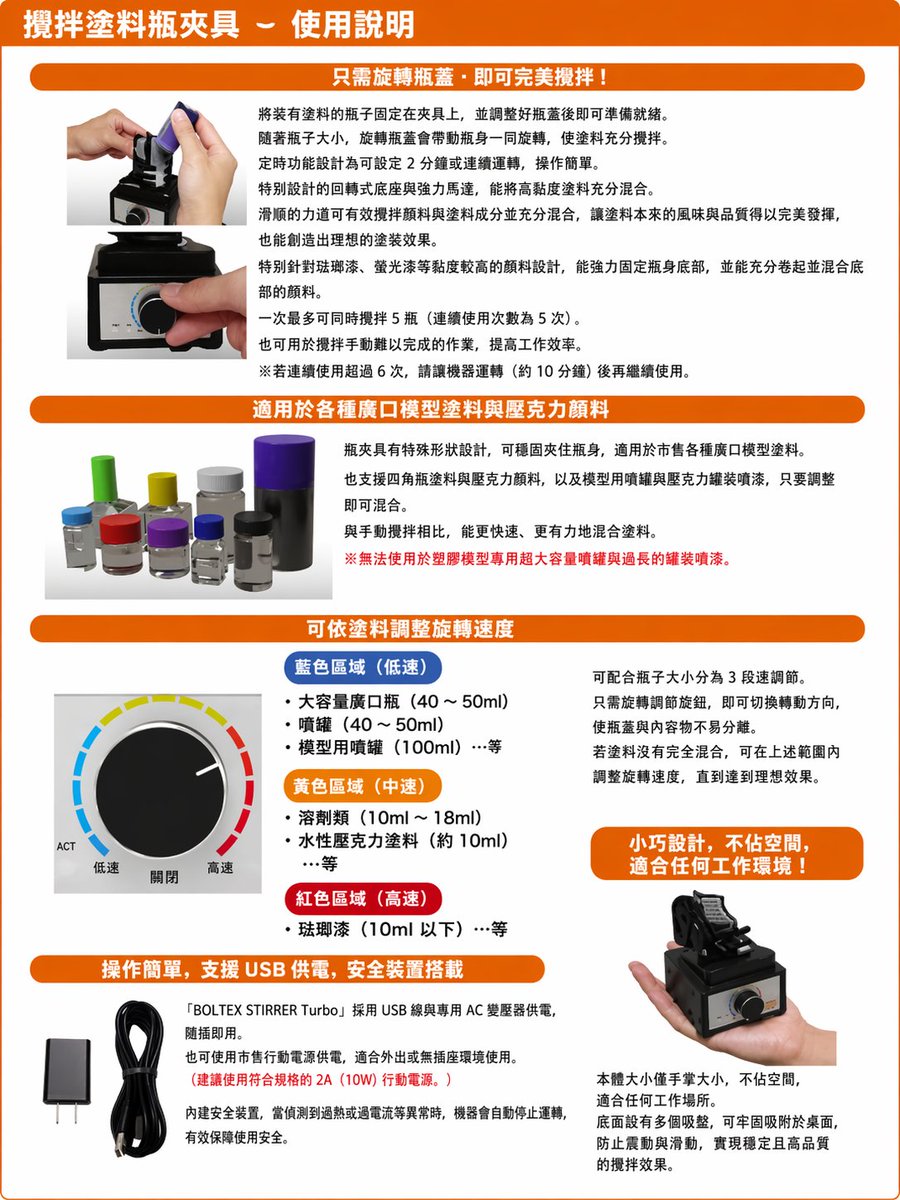
Translate Japanese manual into Chinese leaflet
Generates a polished Traditional Chinese localized product instruction sheet from a photographed Japanese manual while preserving the original layout and images.
This is a GPT Image 2 prompt case for 平面海报. Use the copy-ready prompt below to generate similar visuals, and review Awesome GPT Image 2 Prompts attribution plus commercial-use rights before reuse.
Need the full prompt set? Use the 平面海报 topic hub for more related examples, or open the GPT Image 2 prompt library for the full example index, reusable structures, and source attribution.
Prompt
Copy-ready prompt
Referring to the provided reference images, recreate a clean, locally translated product manual in Traditional Chinese. Maintain the original page layout, product photos, chapter structure, orange rounded corner titles, and overall manual composition. Replace all Japanese text with fluent Traditional Chinese that is accurate in meaning and consistent in format. Update the main title to a bold Traditional Chinese title at the top of the page. Retain the four orange chapter columns and their positions, keeping the same image layout: two product usage photos at the top, a row of paint bottle photos in the second section, a close-up of the speed control knob in the third section, two accessory photos in the lower left corner, and a photo of the product being held in the lower right corner. In the speed section, translate the three color-coded speed labels into Traditional Chinese, maintaining their blue, yellow, and red visual distinction. Replace the small orange label on the right with a more refined Traditional Chinese promotional badge. This will make the entire page look cleaner, clearer, and more professionally formatted, presenting a polished product manual rather than the original scanned copy.
More cases in this category
Prioritized by category, input mode compatibility, quality, and lower risk.

Reuse and source notes
Use this prompt safely after previewing the case.
- 1.Copy the prompt or open it directly in Dovoo with the generation button.
- 2.Adjust variables, aspect ratio, and reference images for your own use case.
- 3.Before publishing or paid usage, verify source rights, attribution requirements, and brand or likeness risks.
Can I use this prompt commercially?
Commercial-use status is allowed. Review the original source, license, brand constraints, and legal requirements before paid usage.
Where does this case come from?
This case is imported from Awesome GPT Image 2 Prompts; keep attribution visible and check the source URL before reuse.