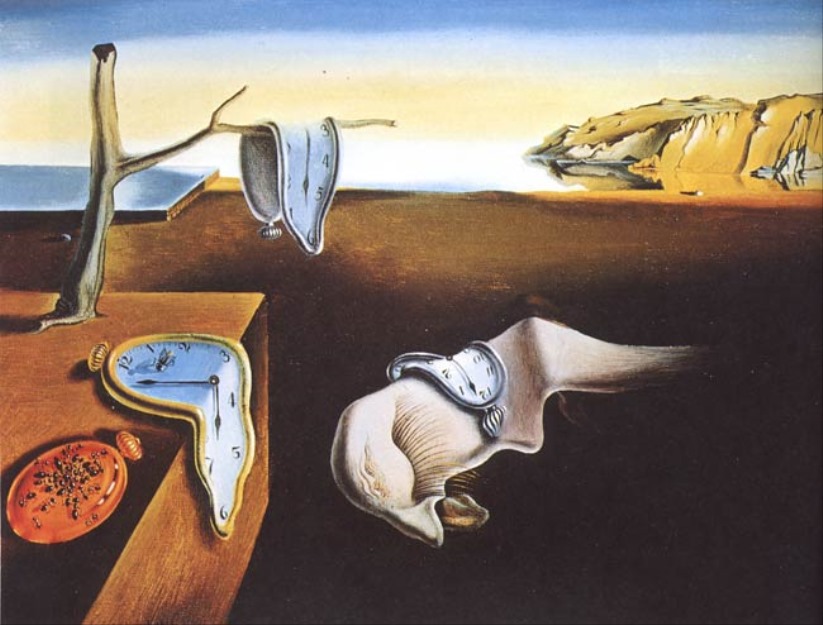
Surreal Melting Clocks Desert
A surrealist oil-painting prompt for generating a Dali-inspired coastal desert scene with melting clocks and uncanny dream imagery.
This is a GPT Image 2 prompt case for 插画艺术. Use the copy-ready prompt below to generate similar visuals, and review Awesome GPT Image 2 Prompts attribution plus commercial-use rights before reuse.
Prompt
Copy-ready prompt
Create a dreamlike surrealist oil painting, inspired by Salvador Dalí's *The Persistence of Memory*: a desolate coastal desert at dusk, a low horizon, a calm blue sea to the left, a pale yellow sky gradually fading to blue, and distant ochre cliffs shimmering in the light and shadow. In the foreground, place a sharply edged brown wooden platform extending from the lower left corner, upon which grows a withered, leafless tree. Include four clearly visible clocks: a soft blue-grey melted clock hanging from a branch, a pale melted clock sliding across the edge of the platform with black numerals, a soft white melted clock folded over the face of a strange sleeping creature in the lower right corner, and an orange closed pocket watch placed on the platform, covered with numerous tiny black ants. Use elongated shadows, smooth, realistic brushstrokes, an eerie stillness, distorted forms, high contrast between warm earth tones and cool blue highlights, and a vintage museum painting texture. Maintain a sparse and eerie composition, with no people or modern objects in the image, and no readable text except for clock markings. Optional custom details:{argument name="surrealist style" default="Salvador Dalí's *The Persistence of Memory*"} ,{argument name="sky color" default="Pale yellow gradually turns into blue"} ,{argument name="landscape setting" default="The desolate coastal desert at dusk"} ,{argument name="number of timepieces" default="4"} ,{argument name="foreground platform color" default="warm brown wood"} .Prompt variables
Editable argument placeholders found in the prompt, with their default values.
More cases in this category
Prioritized by category, input mode compatibility, quality, and lower risk.

Reuse and source notes
Use this prompt safely after previewing the case.
- 1.Copy the prompt or open it directly in Dovoo with the generation button.
- 2.Adjust variables, aspect ratio, and reference images for your own use case.
- 3.Before publishing or paid usage, verify source rights, attribution requirements, and brand or likeness risks.
Can I use this prompt commercially?
Commercial-use status is allowed. Review the original source, license, brand constraints, and legal requirements before paid usage.
Where does this case come from?
This case is imported from Awesome GPT Image 2 Prompts; keep attribution visible and check the source URL before reuse.