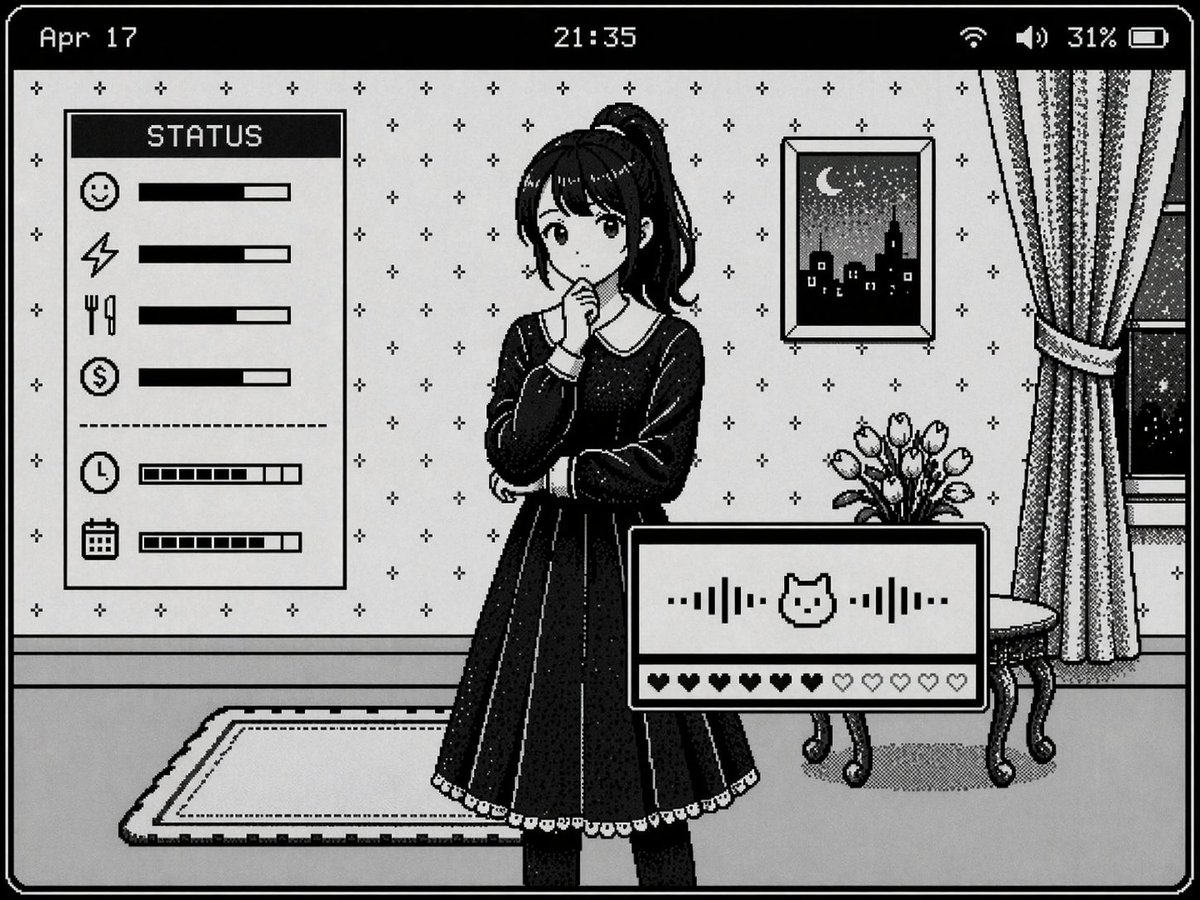
Retro Pixel Art UI Mockup
Generates a 1-bit monochrome pixel art visual novel interface featuring a character, background details, and multiple status panels.
This is a GPT Image 2 prompt case for 动漫游戏. Use the copy-ready prompt below to generate similar visuals, and review Awesome GPT Image 2 Prompts attribution plus commercial-use rights before reuse.
Prompt
Copy-ready prompt
{
  "type": "Retro monochrome pixel art visual novel interface",
  "style": "1-bit pixel art, black and white color scheme, jittery shadows, classic Macintosh aesthetics.",
  "character": {
    "description": "{argument name=\"character appearance\" default=\"An anime girl with a high ponytail, wearing a dark dress with a white collar.\"}",
    "pose": "Standing, chin resting on hand, expression thoughtful."
  },
  "background": {
    "setting": "Indoor scenes",
    "details": [
      "Wallpaper with small cross pattern",
      "Framed painting of a new moon night view city skyline",
      "Windows with curtains",
      "A small table for displaying tulip vases",
      "Carpet on the floor"
    ]
  },
  "layout": {
    "top_bar": {
      "left": "{argument name=\"date text\" default=\"April 17\"}",
      "center": "{argument name=\"time text\" default=\"21:35\"}",
      "right": "Wi-Fi icon, speaker icon, 31%, battery icon"
    },
    "panels": [
      {
        "position": "center left",
        "title": "{argument name=\"status panel title\" default=\"state\"}",
        "count": 6,
        "rows": [
          "smiley face icon and solid progress bar",
          "Lightning icon and solid progress bar",
          "Knife and fork icons and solid progress bar",
          "Dollar sign icon and solid progress bar",
          "Clock icon and segmented progress bar",
          "Calendar icon and segmented progress bar"
        ]
      },
      {
        "position": "Bottom right",
        "elements": [
          "With center{argument name=\"interaction icon\" default=\"cat face\"} Audio waveform of the icon",
          "A row of 10 hearts, 6 filled and 4 empty."
        ]
      }
    ]
  }
}
Prompt variables
Editable argument placeholders found in the prompt, with their default values.
More cases in this category
Prioritized by category, input mode compatibility, quality, and lower risk.

Reuse and source notes
Use this prompt safely after previewing the case.
- 1.Copy the prompt or open it directly in Dovoo with the generation button.
- 2.Adjust variables, aspect ratio, and reference images for your own use case.
- 3.Before publishing or paid usage, verify source rights, attribution requirements, and brand or likeness risks.
Can I use this prompt commercially?
Commercial-use status is allowed. Review the original source, license, brand constraints, and legal requirements before paid usage.
Where does this case come from?
This case is imported from Awesome GPT Image 2 Prompts; keep attribution visible and check the source URL before reuse.