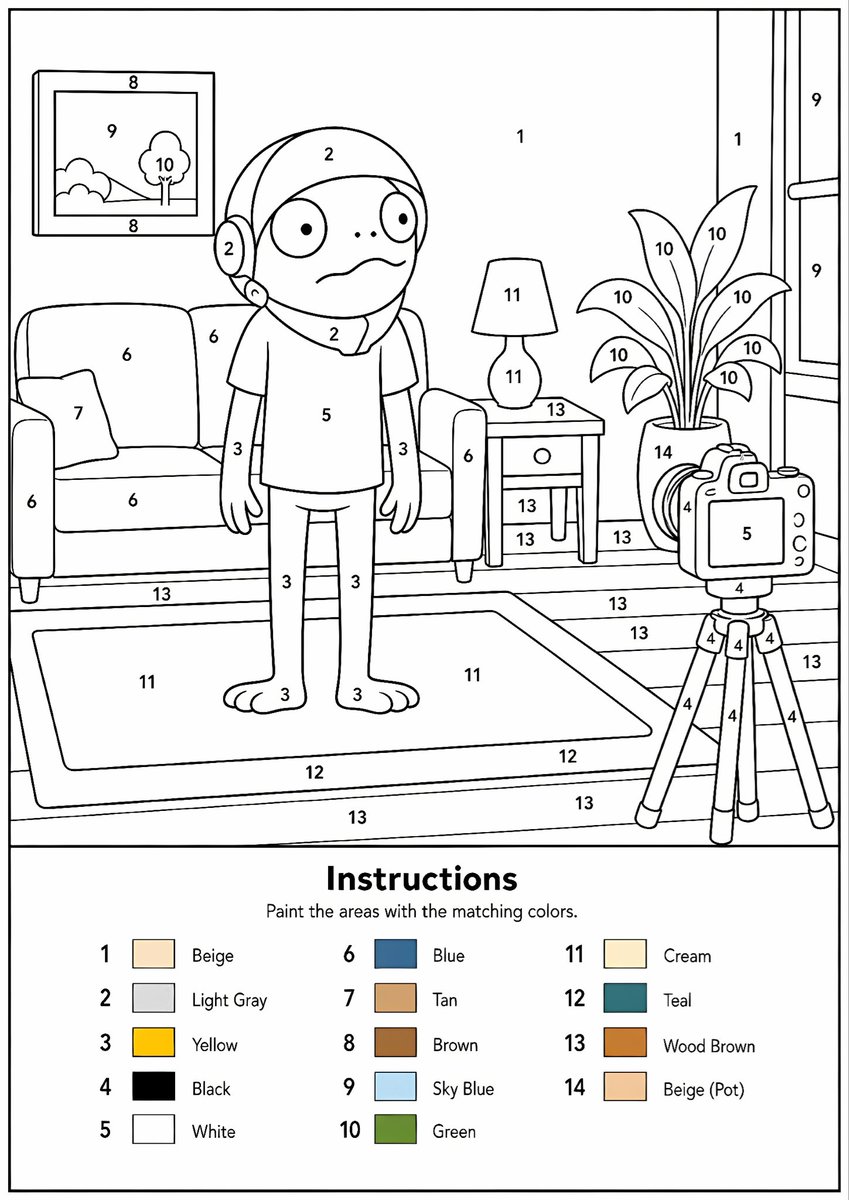
Paint-by-Numbers Living Room Worksheet
Generates a printable A4 paint-by-numbers coloring worksheet with a numbered cartoon living room scene and a 14-color legend.
This is a GPT Image 2 prompt case for 插画艺术. Use the copy-ready prompt below to generate similar visuals, and review Awesome GPT Image 2 Prompts attribution plus commercial-use rights before reuse.
Prompt
Copy-ready prompt
目标:创建一张可打印的数字油画练习页,展示一个卡通客厅场景,中心站着一个类似儿童的角色,设计为简洁的黑白线条画,带有编号区域和颜色图例。

画布:A4 纵向页面,300 DPI,白色背景,细黑色外边框,清晰的矢量风格轮廓,除图例中的微小色块外无阴影。主插图占据页面上方约 70% 的空间,说明/颜色键面板占据下方约 30% 的空间。

主插图布局:绘制一个采用简洁圆润卡通风格的温馨客厅。中心:一个站立的卡通角色,有着大圆眼、小点鼻、担忧的波浪嘴、兜帽或头盔状头发、短袖衬衫、细手臂、长裤和赤脚。左侧:一张沙发,有两个座垫/靠垫,两侧各有一个可见的扶手,以及一个小靠枕。沙发上方:一幅带框的墙面画,包含一个小风景,有山丘、天空和一棵树。角色右侧:一张侧桌,上面有一盏灯和一个抽屉;后方/右侧有一盆高大的盆栽,正好有 10 片可见叶子。最右侧:一台三脚架上的相机,对准角色,带有屏幕/机身、镜头/按钮,以及正好三条三脚架腿。背景包括一面墙、右侧一扇带有垂直窗格的大窗户、带有木板线条的地板,以及前景中一块大的长方形地毯。

数字涂色区域:在场景的线条区域内放置黑色数字,使用 1 到 14 的数字。在匹配的表面上重复使用相同的数字。保持数字清晰并居中于形状内。匹配指定的分配:1 为米色墙面区域,2 为浅灰色头部/兜帽区域,3 为黄色皮肤/四肢,4 为黑色相机/三脚架细节,5 为白色衬衫和相机屏幕,6 为蓝色沙发,7 为棕褐色靠枕,8 为棕色画框,9 为天蓝色窗户/画中天空,10 为绿色植物/树叶,11 为奶油色灯具/地毯内部,12 为青色地毯边框,13 为木棕色地板/桌子/木板区域,14 为米色花盆。

底部说明面板:在图例上方添加一条水平分隔线。居中放置一个粗体标题,内容为 {argument name="instruction title" default="说明"}。在其下方,添加较小的文字,内容为 {argument name="instruction subtitle" default="用对应的颜色涂满区域。"}。下方排列 14 个颜色图例条目,分为三列。每个条目包含一个数字、一个小填充色块和一个英文颜色标签。14 个条目必须为:1 Beige (米色), 2 Light Gray (浅灰色), 3 Yellow (黄色), 4 Black (黑色), 5 White (白色), 6 Blue (蓝色), 7 Tan (棕褐色), 8 Brown (棕色), 9 Sky Blue (天蓝色), 10 Green (绿色), 11 Cream (奶油色), 12 Teal (青色), 13 Wood Brown (木棕色), 14 Beige (Pot) (米色花盆)。

风格限制:使其看起来像一张精致的儿童可打印练习页,具有平滑统一的黑色轮廓、圆润友好的形状、大量适合涂色的封闭区域,无渐变,无逼真纹理,无额外文字,无水印。主体可自定义为 {argument name="central character" default="一个担忧的卡通儿童形象"},场景为 {argument name="room setting" default="温馨客厅"},调色板为 {argument name="color palette" default="14 色数字油画调色板"}。
Prompt variables
Editable argument placeholders found in the prompt, with their default values.
More cases in this category
Prioritized by category, input mode compatibility, quality, and lower risk.

Reuse and source notes
Use this prompt safely after previewing the case.
- 1.Copy the prompt or open it directly in Dovoo with the generation button.
- 2.Adjust variables, aspect ratio, and reference images for your own use case.
- 3.Before publishing or paid usage, verify source rights, attribution requirements, and brand or likeness risks.
Can I use this prompt commercially?
Commercial-use status is allowed. Review the original source, license, brand constraints, and legal requirements before paid usage.
Where does this case come from?
This case is imported from Awesome GPT Image 2 Prompts; keep attribution visible and check the source URL before reuse.