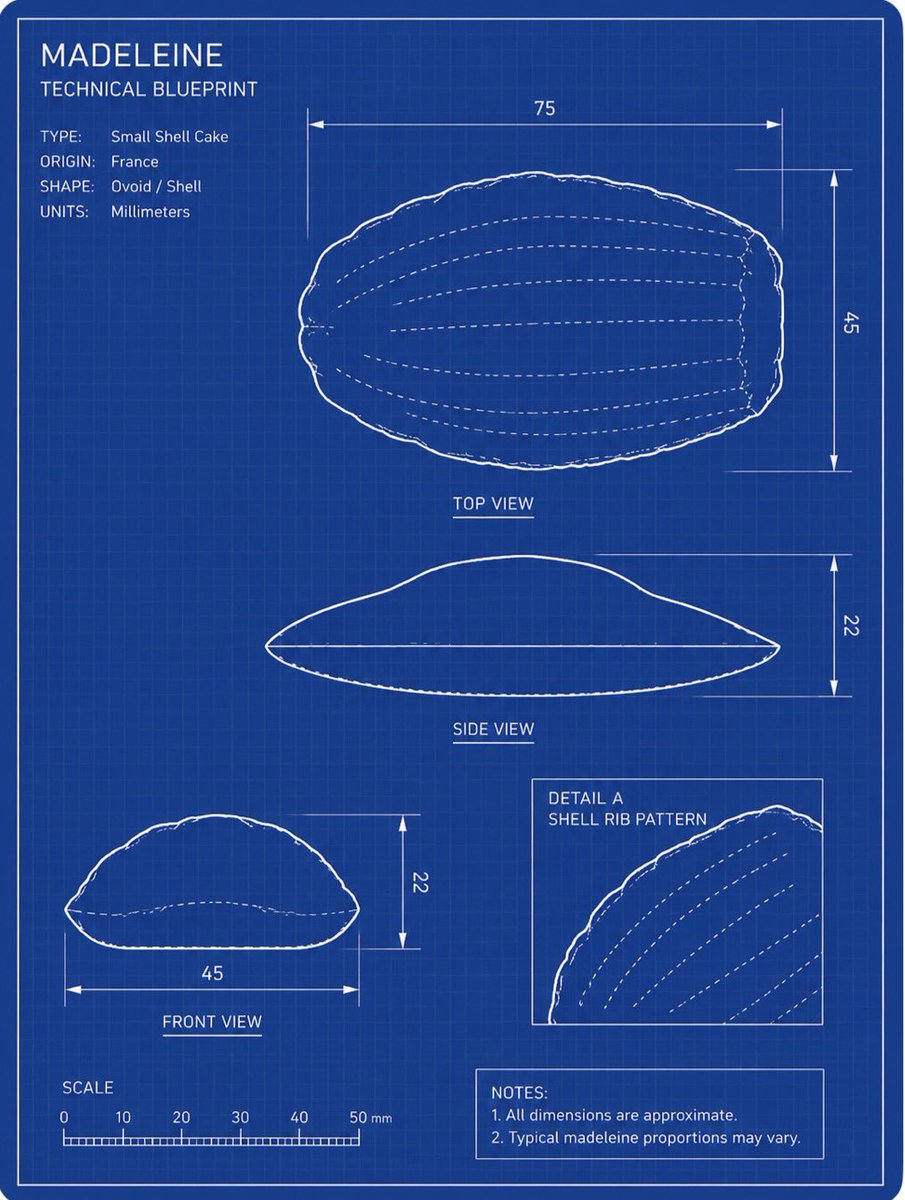
Madeleine Technical Blueprint
Transforms a reference photo of a madeleine into a white-on-blue engineering blueprint with labeled views, dimensions, scale, and notes.
This is a GPT Image 2 prompt case for 插画艺术. Use the copy-ready prompt below to generate similar visuals, and review Awesome GPT Image 2 Prompts attribution plus commercial-use rights before reuse.
Prompt
Copy-ready prompt
以提供的参考图像为主题,将玛德琳蛋糕转换为清晰的工程蓝图绘图,而非照片。在深蓝色网格背景上创建垂直工程图纸布局,使用细白线条、双边框、测量箭头、标签和示意轮廓,以保留玛德琳蛋糕的贝壳状椭圆形外观。

目标:制作一张标题为 {argument name="title text" default="MADELEINE"}、副标题为 {argument name="subtitle text" default="TECHNICAL BLUEPRINT"} 的蓝图。

布局:包含 4 个源自参考糕点的技术绘图面板:右上角为 1 个大型顶视图,下方居中为 1 个侧视图,左下角为 1 个前视图,右下角为 1 个带框的细节插图,展示贝壳肋纹图案。使用白色轮廓线和虚线内部肋纹线。

技术文本:在左上角添加一个规格说明块,包含 4 行内容:类型:{argument name="type label" default="Small Shell Cake"},产地:{argument name="origin label" default="France"},形状:卵形 / 贝壳状,单位:毫米。

测量:添加符合蓝图规范的尺寸线和数字标签:顶视图宽度 75、高度 45,侧视图高度 22,前视图宽度 45、高度 22。在左下角添加一个标有 SCALE 的比例尺,刻度为 0、10、20、30、40、50 毫米。

附加元素:添加插图标签“DETAIL A”和“SHELL RIB PATTERN”。在右下角添加一个注释框,包含 2 条注释:“1. 所有尺寸均为近似值。”以及“2. 玛德琳蛋糕的典型比例可能会有所不同。”

风格限制:请勿将糕点渲染为逼真的食物照片;将其完全转换为蓝底白线的技术示意图。保持蓝图清晰、精确,轮廓边缘带有轻微的手绘感,且不包含多余物体、阴影或水印。
Prompt variables
Editable argument placeholders found in the prompt, with their default values.
More cases in this category
Prioritized by category, input mode compatibility, quality, and lower risk.

Reuse and source notes
Use this prompt safely after previewing the case.
- 1.Copy the prompt or open it directly in Dovoo with the generation button.
- 2.Adjust variables, aspect ratio, and reference images for your own use case.
- 3.Before publishing or paid usage, verify source rights, attribution requirements, and brand or likeness risks.
Can I use this prompt commercially?
Commercial-use status is allowed. Review the original source, license, brand constraints, and legal requirements before paid usage.
Where does this case come from?
This case is imported from Awesome GPT Image 2 Prompts; keep attribution visible and check the source URL before reuse.