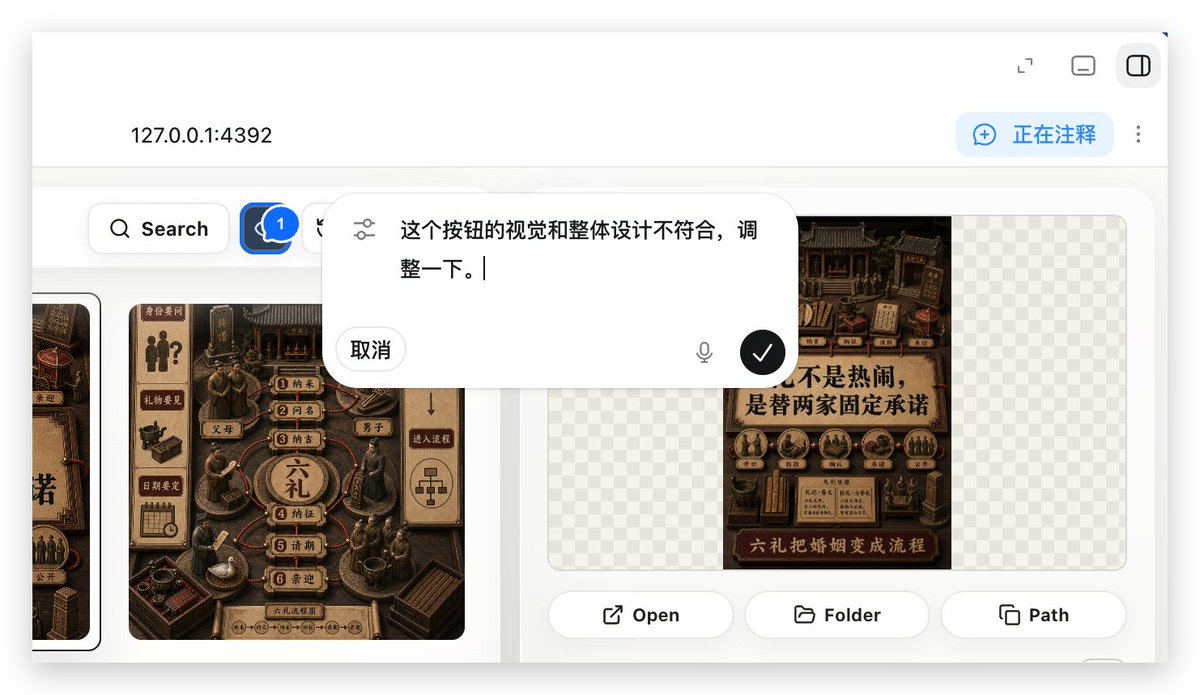
Local Web App Annotation Demo
Generates a realistic localhost web app preview showing an annotation overlay used to request UI adjustments in a Build Web Apps workflow.
This is a GPT Image 2 prompt case for 其他灵感. Use the copy-ready prompt below to generate similar visuals, and review Awesome GPT Image 2 Prompts attribution plus commercial-use rights before reuse.
Prompt
Copy-ready prompt
以 REFERENCE_0 为上下文,创建一个后续截图,展示所选的“Build Web Apps”工具作为本地 Web 应用预览的运行效果。将插件列表视图替换为 {argument name="local address" default="127.0.0.1:4392"} 的浏览器风格 localhost 工作区,采用简洁的白色 UI、柔和阴影和圆角面板。

主要变化:展示一个应用构建/标注界面,而非原始的插件目录。添加一个顶部栏,左侧显示本地地址,右侧显示 3 个小型窗口/控制图标。在右上角添加一个蓝色的标注状态胶囊,文字为 {argument name="annotation status" default="正在注释"},旁边附带一个垂直的三点菜单。

内容区域:创建一个画廊风格的 UI,在圆角白色面板内展示Chinese海报/卡片设计。包含一个左侧工具栏行,带有搜索按钮和一个带有“1”标记的蓝色评论/标注按钮。至少显示两个可见的海报/卡片缩略图,采用深棕色中式传统视觉风格,同时在右侧面板保留一些棋盘格透明占位区域。

覆盖层:在内容区域中上部居中放置一个大型浮动圆角标注输入气泡。它应看起来像一个内嵌式 AI 评论编辑器,左侧带有滑块/设置图标,包含Chinese指令文本 {argument name="comment text" default="这个按钮的视觉和整体设计不符合,调整一下。"}、“取消”按钮、一个小麦克风图标,以及一个带有白色对勾的黑色圆形确认按钮。

右侧预览面板底部:添加 3 个操作按钮,分别标注为“Open”、“Folder”和“Path”,每个按钮配有一个简单的线条图标。保持截图的真实感,如同使用 Build Web Apps 结合内置 HTML 标注来请求 UI 优化的产品演示。
Prompt variables
Editable argument placeholders found in the prompt, with their default values.
More cases in this category
Prioritized by category, input mode compatibility, quality, and lower risk.


Reuse and source notes
Use this prompt safely after previewing the case.
- 1.Copy the prompt or open it directly in Dovoo with the generation button.
- 2.Adjust variables, aspect ratio, and reference images for your own use case.
- 3.Before publishing or paid usage, verify source rights, attribution requirements, and brand or likeness risks.
Can I use this prompt commercially?
Commercial-use status is allowed. Review the original source, license, brand constraints, and legal requirements before paid usage.
Where does this case come from?
This case is imported from Awesome GPT Image 2 Prompts; keep attribution visible and check the source URL before reuse.