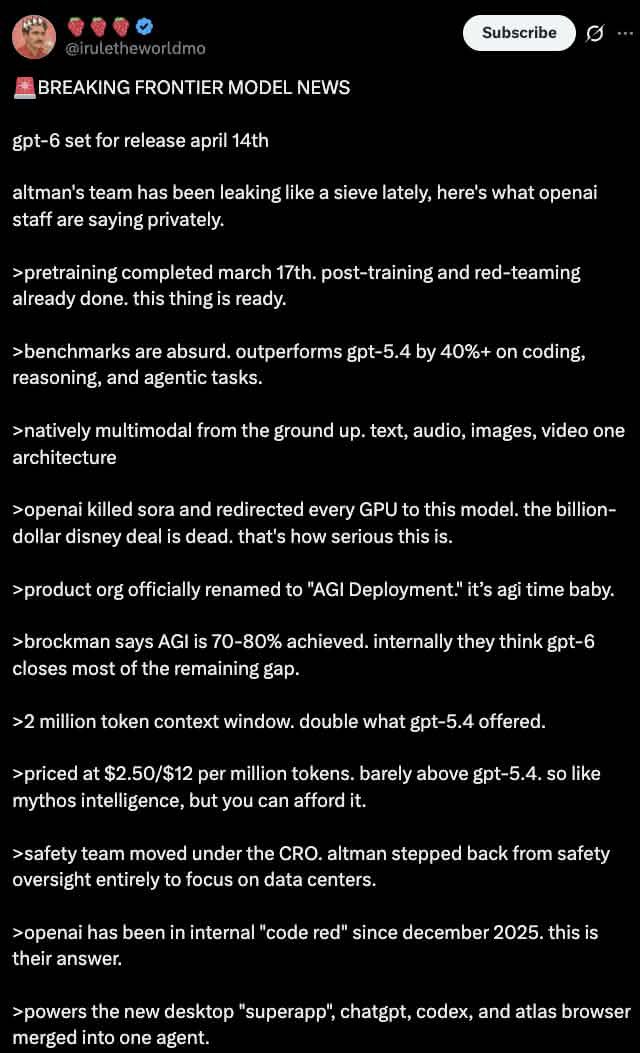
Dark Mode X Post Mockup
Generates a realistic dark mode Twitter/X post screenshot featuring a long list of greentext-style bullet points.
This is a GPT Image 2 prompt case for 平面海报. Use the copy-ready prompt below to generate similar visuals, and review Awesome GPT Image 2 Prompts attribution plus commercial-use rights before reuse.
Need the full prompt set? Use the 平面海报 topic hub for more related examples, or open the GPT Image 2 prompt library for the full example index, reusable structures, and source attribution.
Prompt
Copy-ready prompt
A dark mode screenshot of an X tweet. The profile shows a man wearing a red shirt, a crown, and a beard. The username is {argument name="username" default="@iruletheworldmo"} The tweet is followed by three strawberry emojis and a blue verification checkmark. There's a "Subscribe" button in the upper right corner. The tweet body begins with {argument name="headline" default="🚨 BREAKING FRONTIER MODEL NEWS"} The beginning, followed by{argument name="subheadline" default="gpt-6 set for release april 14th"} And a brief introduction to the OpenAI leaks. Below are 11 key points, each beginning with a ">" symbol, detailing {argument name="bullet point topic" default="fictional AI model specs"} Features include pre-training dates, performance exceeding GPT-5.4, native multimodal capabilities, replacing Sora, renaming to "AGI Deployment," 2 million token contexts, pricing, security team changes, a red alert for 2025, and a brand-new desktop super app. The text uses a standard sans-serif UI font and appears white on a black background.Prompt variables
Editable argument placeholders found in the prompt, with their default values.
Variable
username
Default
@iruletheworldmo
Variable
headline
Default
🚨 BREAKING FRONTIER MODEL NEWS
Variable
subheadline
Default
gpt-6 set for release april 14th
Variable
bullet point topic
Default
fictional AI model specs
More cases in this category
Prioritized by category, input mode compatibility, quality, and lower risk.

Reuse and source notes
Use this prompt safely after previewing the case.
- 1.Copy the prompt or open it directly in Dovoo with the generation button.
- 2.Adjust variables, aspect ratio, and reference images for your own use case.
- 3.Before publishing or paid usage, verify source rights, attribution requirements, and brand or likeness risks.
Can I use this prompt commercially?
Commercial-use status is allowed. Review the original source, license, brand constraints, and legal requirements before paid usage.
Where does this case come from?
This case is imported from Awesome GPT Image 2 Prompts; keep attribution visible and check the source URL before reuse.