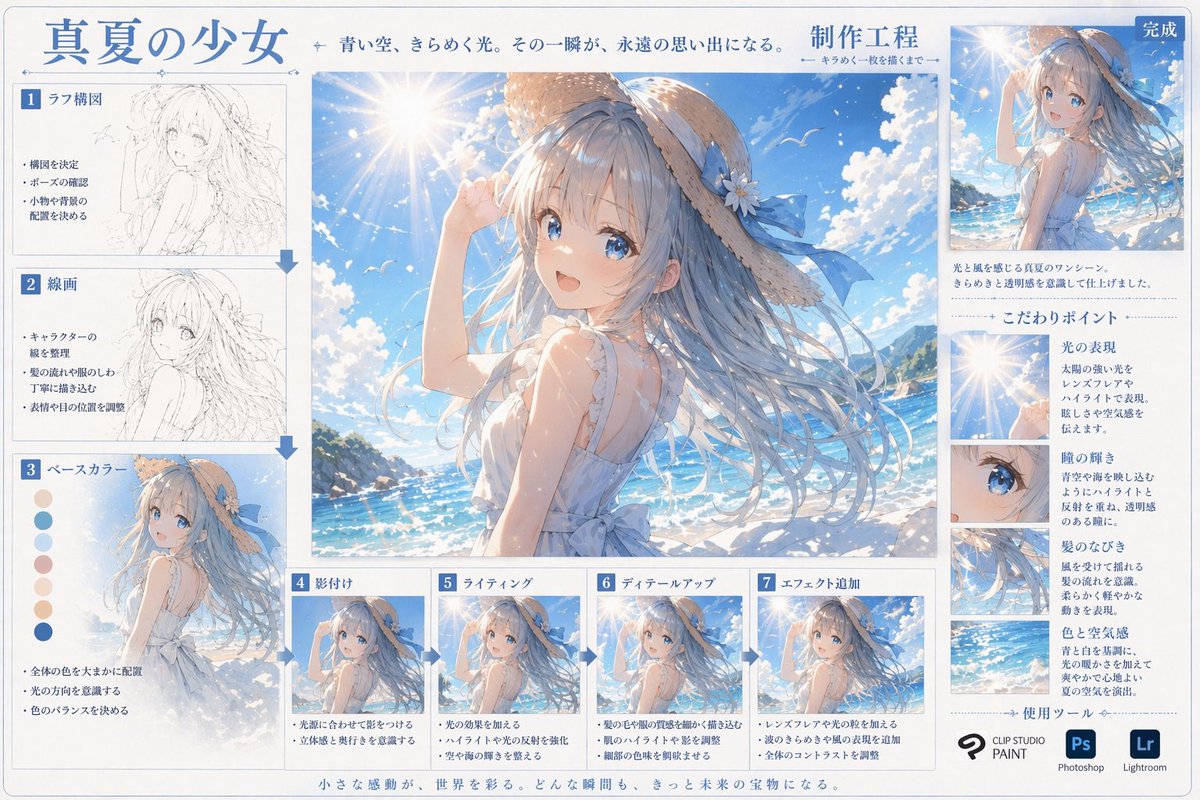
Anime Art Process Infographic
Generates a comprehensive step-by-step digital art tutorial sheet with process thumbnails, color swatches, and detailed focus crops.
This is a GPT Image 2 prompt case for 插画艺术. Use the copy-ready prompt below to generate similar visuals, and review Awesome GPT Image 2 Prompts attribution plus commercial-use rights before reuse.
Prompt
Copy-ready prompt
{
  "type": "Digital Art Creation Process Infographic",
  "header": {
    "title": "{argument name=\"main title\" default=\"Summer Girl\"}",
    "subtitle": "The azure sky shimmered with light and shadow. That moment became an eternal memory.",
    "process_label": "{argument name=\"process title\" default=\"Production Engineering\"}"
  },
  "centerpiece": {
    "description": "High-quality large-scale anime illustrations depicting{argument name=\"character appearance\" default=\"An anime girl with flowing blue hair, wearing a straw hat with a blue ribbon and a white sleeveless summer outfit.\"} Standing{argument name=\"setting\" default=\"Sunny beaches, sparkling blue ocean, and clear skies with lens flare.\"} forward."
  },
  "layout": {
    "left_column": {
      "count": 3,
      "steps": [
        {
          "label": "1. Sketch composition",
          "image_type": "Rough pencil sketch",
          "bullet_points": 3
        },
        {
          "label": "2. Line drawing",
          "image_type": "Clean monochrome line art",
          "bullet_points": 3
        },
        {
          "label": "3. Base color",
          "image_type": "Flat color",
          "extra_elements": "7 round color swatches",
          "bullet_points": 3
        }
      ]
    },
    "bottom_row": {
      "count": 4,
      "steps": [
        {
          "label": "4. Shadows",
          "image_type": "Basic cel shadow",
          "bullet_points": 2
        },
        {
          "label": "5. Light and Shadow",
          "image_type": "Add lighting effects and highlights",
          "bullet_points": 2
        },
        {
          "label": "6. Detailed portrayal",
          "image_type": "Fine detail rendering",
          "bullet_points": 2
        },
        {
          "label": "7. Add special effects",
          "image_type": "Final post-processing effect",
          "bullet_points": 3
        }
      ]
    },
    "right_column": {
      "top_section": {
        "label": "Finish",
        "image_type": "The final illustration in smaller size",
        "description_text": "Two-line text"
      },
      "focus_points": {
        "title": "Key points",
        "count": 4,
        "items": [
          {
            "label": "Light and shadow performance",
            "image_crop": "Lens flare and the sun",
            "description_text": "Short paragraph"
          },
          {
            "label": "Pupil luster",
            "image_crop": "Close-up of the girl's blue eyes",
            "description_text": "Short paragraph"
          },
          {
            "label": "Hair flowing",
            "image_crop": "Close-up of flowing hair",
            "description_text": "Short paragraph"
          },
          {
            "label": "Color and Atmosphere",
            "image_crop": "Ocean and Sky Background",
            "description_text": "Short paragraph"
          }
        ]
      },
      "tools_used": {
        "title": "Use tools",
        "count": 3,
        "logos": [
          "{argument name=\"primary software\" default=\"CLIP STUDIO PAINT\"}",
          "Photoshop (Ps)",
          "Lightroom (Lr)"
        ]
      }
    },
    "footer": {
      "text": "Small moments of inspiration adorn the world. Every instant will become a treasure for the future."
    }
  }
}
Prompt variables
Editable argument placeholders found in the prompt, with their default values.
More cases in this category
Prioritized by category, input mode compatibility, quality, and lower risk.
Reuse and source notes
Use this prompt safely after previewing the case.
- 1.Copy the prompt or open it directly in Dovoo with the generation button.
- 2.Adjust variables, aspect ratio, and reference images for your own use case.
- 3.Before publishing or paid usage, verify source rights, attribution requirements, and brand or likeness risks.
Can I use this prompt commercially?
Commercial-use status is allowed. Review the original source, license, brand constraints, and legal requirements before paid usage.
Where does this case come from?
This case is imported from Awesome GPT Image 2 Prompts; keep attribution visible and check the source URL before reuse.